🛍️
Answers from live store data
Products, prices, stock levels, variations, shipping pages and store policies — the AI searches your catalogue on every question. It never invents a price.
 AI Support Chat · by Mondivio
AI Support Chat puts a multilingual assistant on your WooCommerce store that answers from your real store data — live products, prices, stock and orders — powered by your own OpenAI, Claude or Gemini key.
Products, prices, stock levels, variations, shipping pages and store policies — the AI searches your catalogue on every question. It never invents a price.
A German question gets a German answer — even on an English store. Cross-language product search translates queries into your catalogue's language automatically.
Bring your own OpenAI, Anthropic Claude, Google Gemini or OpenAI-compatible key (OpenRouter, LiteLLM…). No per-message markup, no data pooled through a middleman. Keys stored encrypted.
"Where is my order?" answered securely: order number + billing email verified together, anti-enumeration throttling built in.
When the AI can't resolve it, it logs a ticket with a reference number and full transcript — emailed to your team, visible in wp-admin, with an optional signed webhook to your helpdesk.
Rate limits, honeypots, nonce & referer checks, encrypted keys at rest, configurable IP storage and retention, WordPress privacy-erasure support.
In wp-admin go to Plugins → Add New and search for Mondivio AI Support Chat, or download the zip and upload it there. WooCommerce detected automatically.
Pick a provider — OpenAI, Claude, Gemini or any OpenAI-compatible endpoint — paste your key, hit "Test connection".
Choose your accent colour and greeting, tick "Show the chat widget", done. Add knowledge pages and Pro features whenever you're ready.
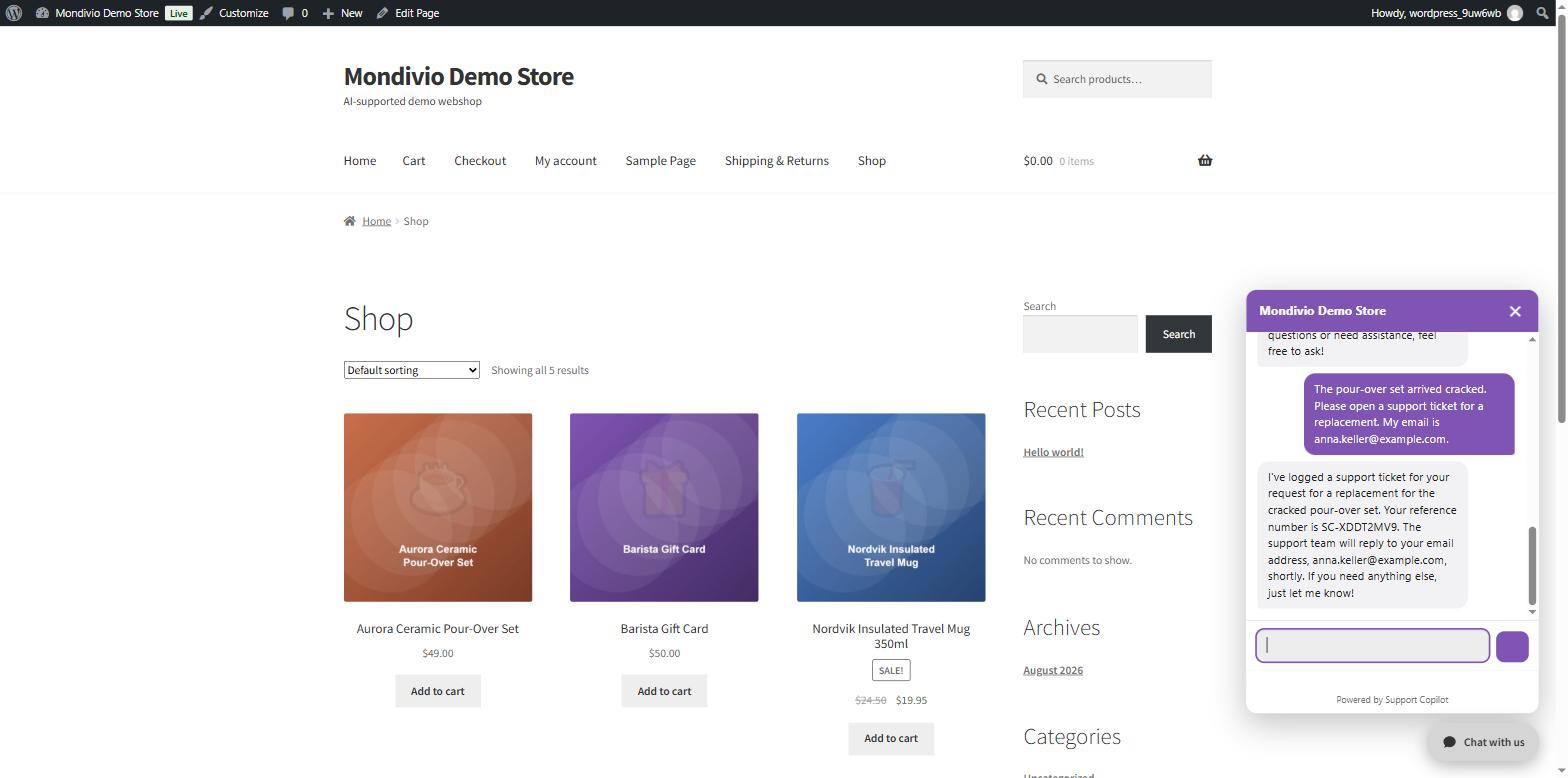
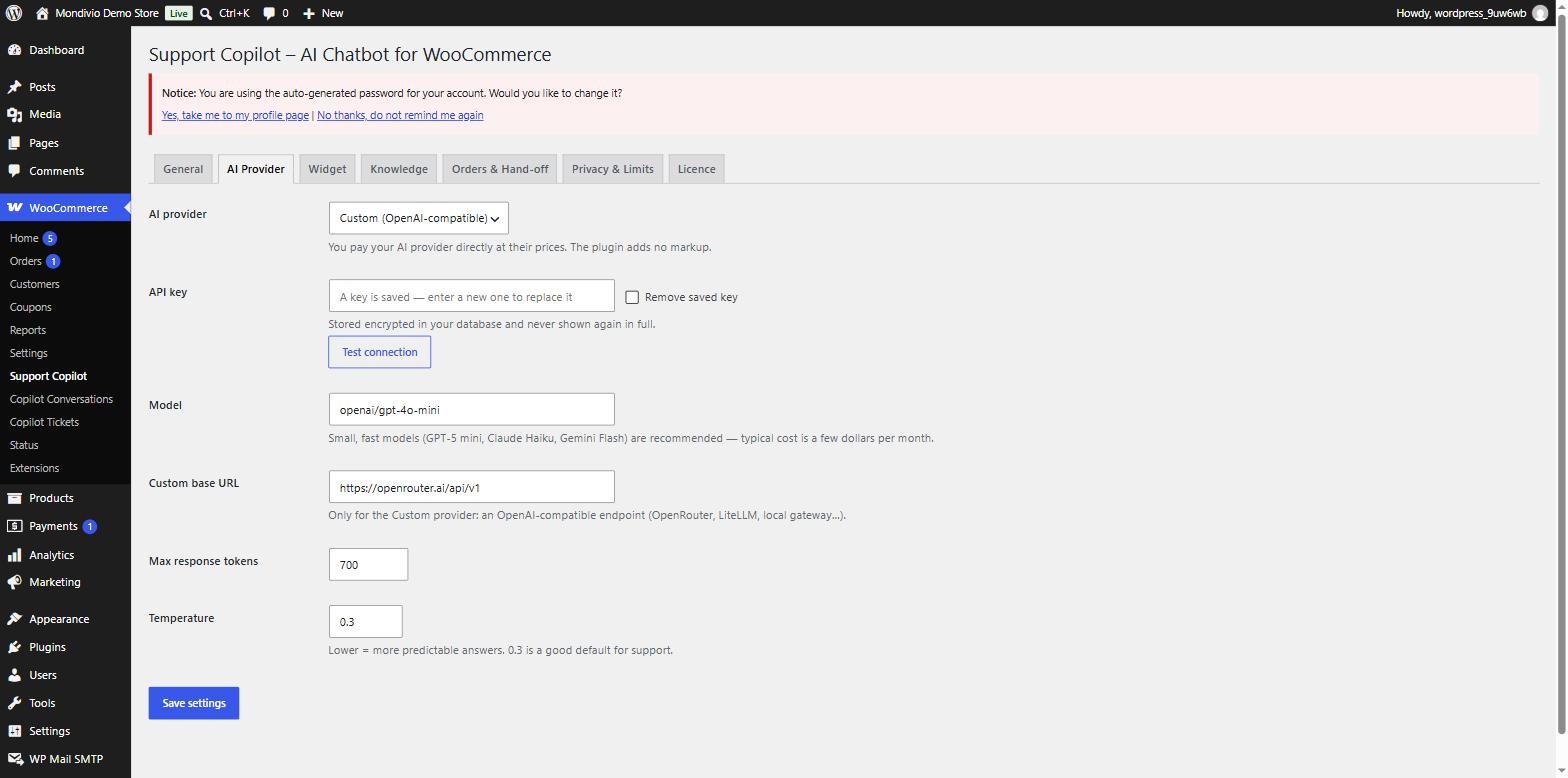


You pay your AI provider directly at their prices — typically a few dollars a month on a small model. The plugin adds no markup.
v1.0.5 · 76 KB · GPLv2 · no account needed
Secure checkout & EU VAT handled by Freemius. 14-day money-back guarantee.
Yes — that's the point. You create a key at OpenAI, Anthropic, Google, or an aggregator like OpenRouter, and paste it into the plugin. You pay them directly at cost (typically a few dollars per month for a small store on a compact model), and your store's data goes straight to your provider — never through our servers.
Any current OpenAI, Claude or Gemini model, plus anything reachable over an OpenAI-compatible endpoint. We recommend small, fast models — GPT‑4o‑mini or Claude Haiku class — which we test against continuously.
A customer must supply both their order number and the billing email; every result is verified against that email before anything is shown, and lookups are throttled per IP to prevent enumeration. The assistant only ever sees a safe summary.
It offers a hand-off: with the customer's consent and email it logs a support ticket with a reference number (like SC‑XDDT2MV9) and the full transcript, emails your team, and can notify your helpdesk via a signed webhook. Tickets live in wp-admin under Copilot Tickets.
IP storage is configurable (off / anonymised / full), conversation retention is limited and configurable, API keys are encrypted at rest, and WordPress privacy-erasure requests remove a customer's conversations and tickets.
Yes — wordpress.mondivio.com is a live demo store. Ask about products in any language, look up demo order #29 with anna.keller@example.com, or report a broken item and watch it create a ticket.
Install free, paste a key, and watch it answer your customers tonight.